Roblox Animal Hospital is not your normal doctor sim. Behind the cute animal patients, something evil is hiding in plain sight. This Animal Hospital Anomaly guide breaks down every anomaly type in the game, how to spot them, and what to do the moment you catch one at your window. New to the front desk? Worry, not, as this Animal Hospital anomalies guide has everything you need to know to survive the first shift!
What Are Anomalies in Animal Hospital?
Anomalies are fake patients that look like normal animals but are hiding something dangerous underneath. They try to sneak past your check-in window and into the hospital. If you let one in, it can drain your sanity, kill other patients, or turn into a hostile monster called a Skinwalker.
The game splits anomalies into three main groups:
- Appearance anomalies – spotted right away at the check-in window, no tools needed
- Photo anomalies – only show up once you take a picture of the patient and let it develop
- CCTV anomalies – look totally normal in person but reveal themselves on the security camera
There are also a few monsters and special characters that are not check-in patients but still show up to cause trouble. We will cover all of them below in this Animal Hospital anomalies list.
Appearance Anomalies List
These are the anomalies you can catch just by looking at the patient standing at your window. No camera or photo needed.
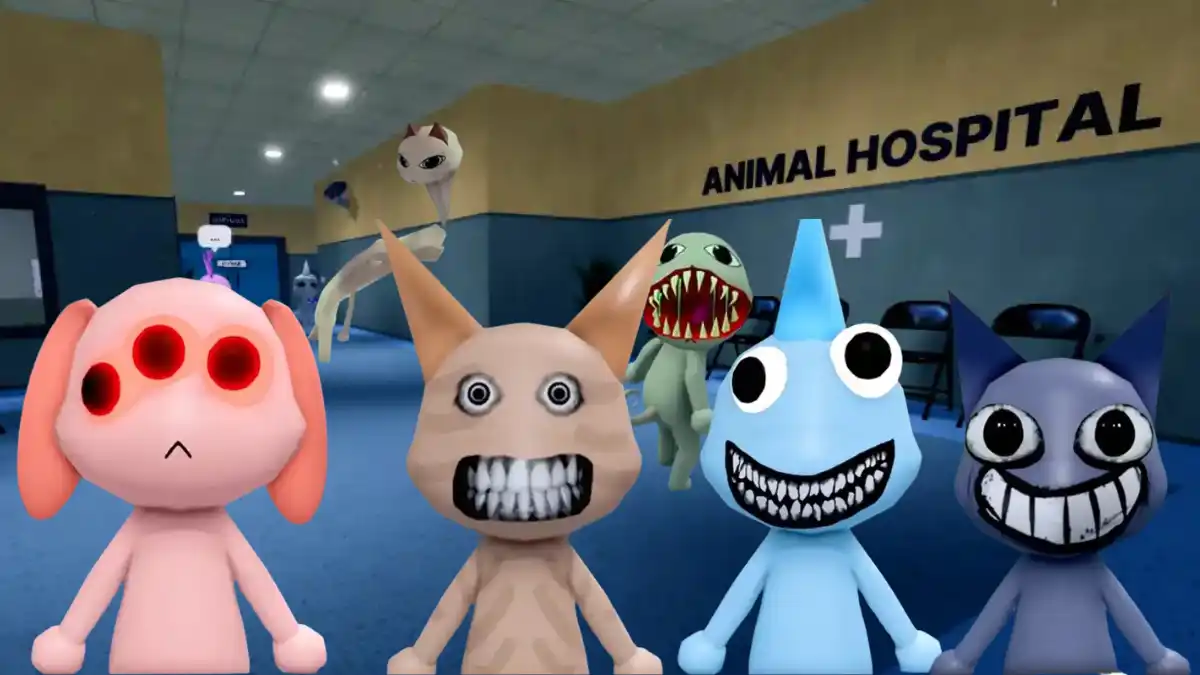
- Three Eyes – A glowing orange or red third eye sits above the normal two. Sometimes the real eyes are still visible underneath. This is one of the easiest anomalies to catch, so close the shutters the second you see it.
- Hollow Face – Empty, hollowed-out eye sockets with a blank, hunched look. Some versions twitch slightly. Letting this one through can lead to bad events later in the shift, so reject it right away.
- Unnatural Grin – A wide, drawn on smile paired with bulging eyes and heavy eyebags. The expression never looks natural, even from far away.
- Human Teeth – Small, round eyes paired with realistic human-style teeth instead of an animal mouth. This one is easy to miss if you are not paying attention to the mouth.
- Twitching – The patient jerks its head, neck, or arms in short bursts. Watch each patient for four to five seconds before checking them in, since this one is easy to rush past.
- Wandering Eyes – The patient’s eyes track you as you move around the room. Normal patients do not do this, so if you notice it, treat it as a red flag.
Photo Anomalies List
Some anomalies look totally normal in person and only reveal themselves once you snap a photo and let it develop. Always wait for the photo to fully print before picking it up, since looking at a cursed photo too early can cost you sanity.
- Changed Patient – The photo shows a different color, marking, or even a different animal entirely compared to the one standing outside.
- Mismatched Eyes – The eyes in the photo do not match the real patient. A missing pupil or an extra eyelid is enough to confirm this one.
- Mismatched Ears – The ear shape, size, or even the animal type changes between the real patient and the photo. This is widely known as one of the hardest anomalies to catch because the difference can be tiny.
- Cursed Face – The patient looks fine in person, but the developed photo shows a distorted, unnaturally realistic face or a creepy expression that never shows up in real life.
- Static Photo – The printed photo is covered in static, grain, or a strange dark filter instead of a clean image. Treat any static photo as an automatic anomaly.
CCTV Anomalies List
These anomalies pass every check at the window and in the photo. The only way to catch them is by watching the security camera feed before you let a patient in.
- The Stare – Instead of facing the reception desk like a normal patient, this anomaly stares straight into whichever camera you are viewing, even if you switch feeds.
- Void Body – The patient’s entire body turns completely black on camera, with no face, eyes, or mouth visible. It is one of the simplest CCTV anomalies to spot because there is nothing else to see.
- Black Bar Eyes – The camera shows a black bar across the face with realistic eyes staring out from it instead of a normal head.
- Distorted Body – The patient’s proportions stretch or twist into impossible shapes on camera, sometimes changing again if you look away and back.
- Camera Mismatched Ears – Similar to the photo version, but only visible by comparing the patient at the desk with what the camera shows.
- Skinwalker – The most dangerous CCTV anomaly. A black figure with glowing red eyes and sharp teeth appears in the booth on camera. The feed usually zooms in automatically, so turn it off fast to avoid losing sanity.
Animal Hospital – Monsters and Special Characters
These are not standard check-in anomalies, but they show up around the hospital and need their own strategy.
- Bed Monster – Long black hands reach out from underneath a hospital bed. Stay out of the red danger zone near the bed or it will drag you or a patient underneath. Feeding it Maple Syrup makes it go away safely.
- Head Banger – Appears at the check-in window and repeatedly bangs its head on the glass, blocking you from closing the shutters. Give it a coffee or wait it out to avoid losing sanity.
- Barney – A special anomaly that does not ask to be admitted as a patient. Instead, it asks for favors like coffee. Helping Barney out rewards you with a second coffee machine, so it is usually worth it.
- Skinwalker (hostile form) – If an admitted anomaly is left untreated or mishandled, it can transform into a hostile Skinwalker that attacks patients and players directly.
How to Deal with Anomalies in Animal Hospital?
Once you spot an anomaly, you have two main options:
- Close the shutters – The safest choice for most anomalies. This simply denies them entry with no risk to your sanity.
- Taser or shoot them – Using a taser on a confirmed anomaly rewards a small sanity boost, while shooting neutralizes it without any bonus. Save these tools for anomalies that refuse to leave on their own, like the Head Banger.
A good routine is to always check the patient in this order: look at their appearance first, take a photo and wait for it to develop, then check the CCTV feed before opening the shutters. Skipping any one of these steps is the easiest way to accidentally let a dangerous anomaly slip through.
Players can enjoy Animal Hospital, and other such exciting Roblox games even more on a bigger screen of their PC or Laptop with keyboard and mouse via BlueStacks.